An AI-native note editor with semantic search that scales to 50,000+ pages. Self-hosted, local-first, and built so AI can work directly inside your documents instead of being an external fixture.
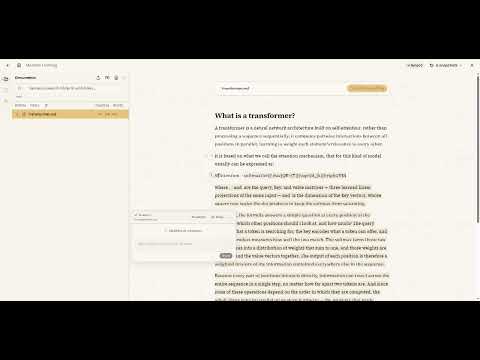
- Semantic search over large text collections. Find concepts, not keywords, across books and notes. Benchmarked against Project Gutenberg up to 47,112 pages (~19M words): query p50 stays under 52 ms with Qdrant; SQLite degrades to ~1.3s.
- Real-time collaboration via WebSockets.
- AI-native editing: inline suggestions and transformations that see your document structure, not a chat box.
- Zero-dependency default: runs out of the box on SQLite's vector extension; optional Qdrant for scale.
- Local-first: your data stays in a standard SQLite file you own.
We benchmarked vector retrieval latency with the same chunker (400-word pages) and embedding provider used by the app. All numbers are single-client latency; queries are awaited sequentially. Qdrant uses default configuration and is memory-resident. Each pass runs 32 queries, repeated 20 times after 3 warmup passes.
| Pages | Backend | Upsert time | Query p50 | Query p95 | Query p99 |
|---|---|---|---|---|---|
| 500 | sqlite | 3.85s | 16.0ms | 16.5ms | 16.7ms |
| 500 | qdrant | 1.74s | 43.4ms | 44.9ms | 45.6ms |
| 1,000 | sqlite | 8.26s | 30.4ms | 35.6ms | 44.8ms |
| 1,000 | qdrant | 2.36s | 44.0ms | 45.8ms | 46.8ms |
| 5,000 | sqlite | 40.31s | 146.8ms | 161.5ms | 172.6ms |
| 5,000 | qdrant | 10.43s | 44.6ms | 45.9ms | 46.3ms |
| 47,112 | sqlite | 6m 14.33s | 1.33s | 1.41s | 1.45s |
| 47,112 | qdrant | 1m 22.62s | 51.9ms | 83.4ms | 93.5ms |
Takeaway: SQLite works well for small libraries (< 1,000 pages). Above that,
switch to Qdrant (VECTOR_STORAGE=qdrant).
bun install
cp .env.example .env   # edit as needed
bun run dev            # builds @lucentdocs/core, then starts the API with watch
The web app is served by the API in development. See .env.example for configuration.
SQLite is the default (VECTOR_STORAGE=sqlite). To use Qdrant:
docker compose --profile qdrant up -d
# set VECTOR_STORAGE=qdrant in .envdocker compose --profile qdrant up -d # required for the Qdrant half
bun run bench:vector # 500, 1000, 5000, full (skip targets >= loaded pages)
bun run bench:vector -- --size 500 # one sizeBenchmark data and embeddings are cached under data/vector-bench/. It never writes
to the app database (LUCENTDOCS_DATA_DIR/sqlite.db).
Package layout
| Package | Role |
|---|---|
apps/api |
Express + tRPC backend, Yjs, job workers |
apps/web |
Vite + React frontend |
packages/core |
Rust native module (@lucentdocs/core) — SQLite storage, embeddings prep, markdown |
packages/shared |
Shared TypeScript types and config |
- Bun
- Rust toolchain (
rustup) - Linux:
libsqlite3-devandpkg-config(for the default native build)
All SQLite I/O runs in Rust and is exposed to Node/Bun via NAPI. TypeScript uses thin
adapters in apps/api/src/infrastructure/rust/. Vector search uses sqlite-vec,
compiled into the native module (no npm platform packages).
Build the native addon:
cd packages/core
npm run build              # links system SQLite (default)
npm run build:bundled      # embeds SQLite when pkg-config is unavailable
Cross-compiled targets (musl, aarch64 Linux, Android) use bundled SQLite; the nightly
CI workflow passes --features sqlite-bundled for those matrix entries automatically.
Musl cross-builds also need packages/core/musl_compat.h on the compiler include path
(CI sets this via CFLAGS_<target>).
bun run testTests use isolated data under data-test/ (LUCENTDOCS_TEST_MODE=1). In-memory test
databases write temp files to apps/api/tmp/ by default. If /tmp is a small tmpfs
and fills up, set TMPDIR or LUCENTDOCS_MEM_DB_DIR to a path on disk.
bun run build
bun run servecp .env.example .env # edit as needed
docker compose up -dPulls sandmor/lucentdocs:latest. The
app is at http://localhost:5677. Data persists in the lucentdocs-data volume.
Compose sets HOST, NODE_ENV, LUCENTDOCS_DATA_DIR, and QDRANT_URL for the
container.
CI image publishing
The Docker workflow builds on pull requests and pushes
to Docker Hub on pushes to master and
version tags (v*).
Set these repository secrets:
| Secret | Value |
|---|---|
DOCKER_USERNAME |
Docker Hub username |
DOCKER_PASSWORD |
Docker Hub access token |
On master, published tags include latest and sha-<short-sha>. Version tags (for
example v1.2.3) also receive semver tags.
bun run typecheck
bun run lint
bun run format
bun run bench:vector