An interactive Zigbee network map for the wiserHomeAssistantPlatform integration. See how devices connect to your hub and repeaters, inspect signal quality, and arrange the map to suit your dashboard.
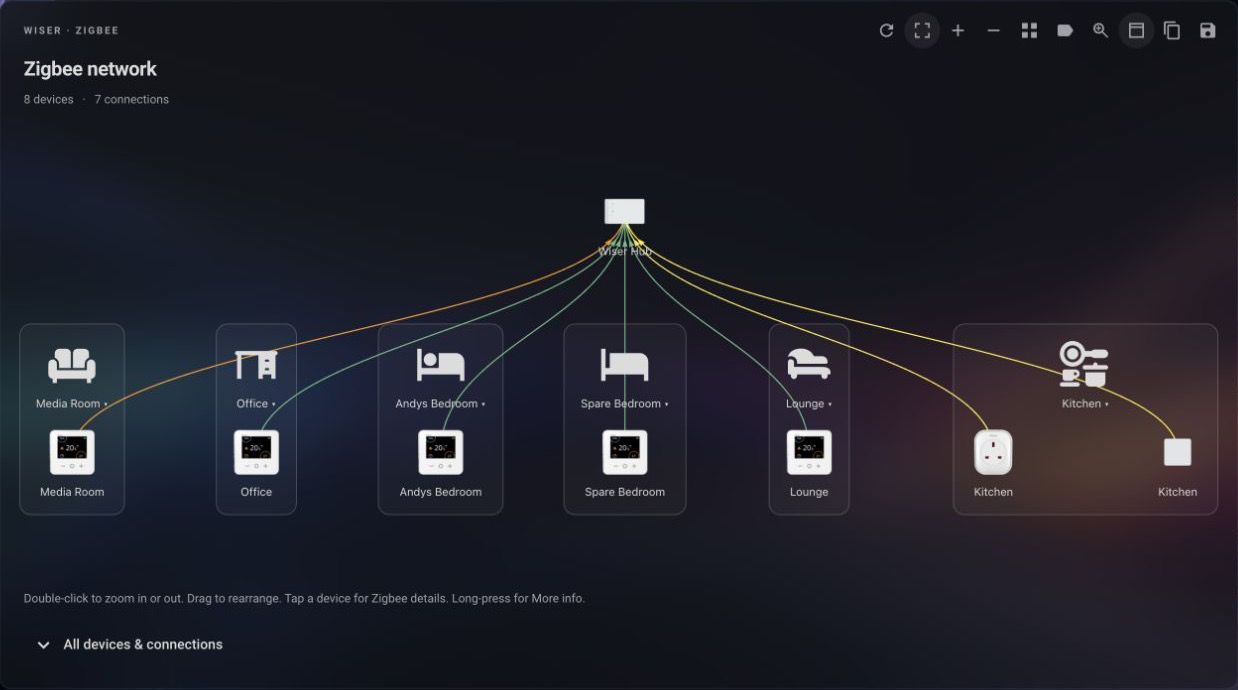
- Real device connections with product images, signal colours and optional link labels.
- Horizontal, Vertical and Pie layouts, with optional Home Assistant area grouping.
- Device details, zoom controls and a magnifying glass for exploring larger networks.
- Saved layouts shared through dashboard configuration, plus toolbar Copy/Paste for card and panel settings.
- Native Home Assistant controls and theme support, with English, German and French translations.
Release versions of Wiser Zigbee Card are included with the wiserHomeAssistantPlatform integration. Install or update the integration to receive the bundled card; no separate card installation is needed.
You need a configured Wiser integration. Each card displays one hub; add separate cards for additional hubs.
Add Wiser Zigbee Card to your dashboard and select Wiser Hub in the visual editor.
The wiki contains the full documentation:
- Sidebar panel — hub tabs and panel settings.
- Configuration — editor options and YAML examples.
- Using the map — toolbar, gestures, device details and signal colours.
- Areas and layouts — grouping, orientation and map sizing.
- Saving layouts — saving and transferring card and panel settings.
- Troubleshooting — help with loading, device details and saved layouts.
- Development — building, testing and running the demo.
Product images are embedded in the bundle. See ASSETS.md for image sources and device coverage.
Originally created by Mark Parker (@msp1974).