
Your coding agent for controlled development in the workspace you lead.




Website · Quickstart · Docs · Wiki
Your terminal can run an agent. Your workspace should help you lead it.
gentle-shell is your coding agent, bringing your changes, tasks, and engineering workflow together—built for Pi.
One workspace. A coding agent you direct. A workflow you can inspect.
BUILT FOR PI · Coding-agent workspace · Focused agents · ODD + optional SDD
Built for Pi. Shaped by Gentle-AI.


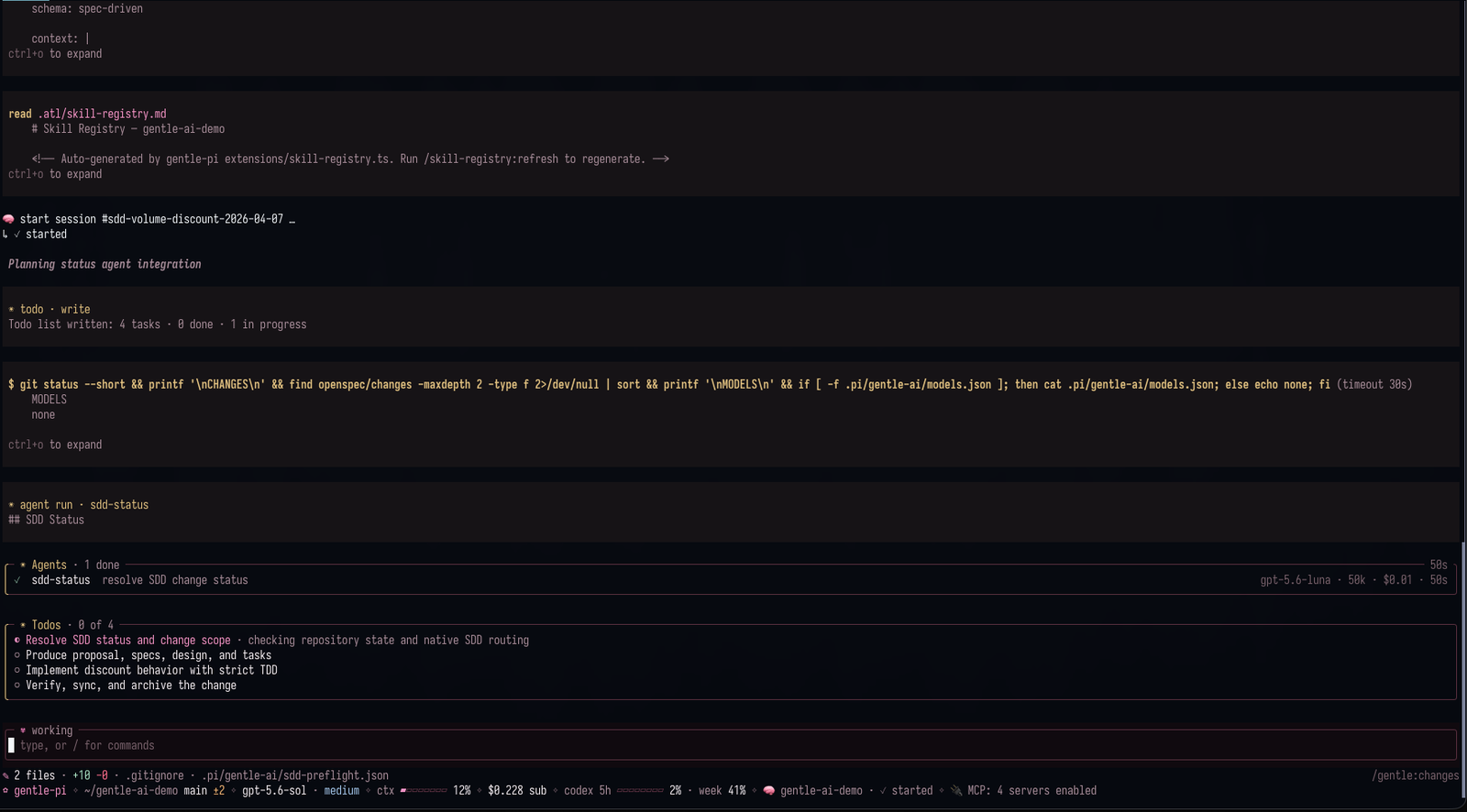
A complete workspace for the agent you direct. gentle-shell is your coding agent, built for Pi, with native workspace features for agent orchestration, usage monitoring for supported provider accounts, and built-in diff views—all in one integrated layout.
See active tasks, session changes, and runtime status without leaving the work you are leading.
gentle-shell in action. Screenshot from Gentle-AI.
→ Read the gentle-shell reference

Say what you need once, then keep moving. el Gentleman helps turn intent into clear scope, a sensible next step, and evidence people can review—without making every task feel like a process meeting.
→ Follow the organic workflow and recovery
→ See persona modes and routing

Bring in help without losing the thread. Focused package-owned Pi agents can map a codebase, implement a bounded change, or verify it, while one parent stays accountable for the scope, the decisions, and the final summary.
orchestrator_session_id,orchestrator_list, andorchestrator_send_messageprovide local-profile session notifications. List results advertise IDs only and reachability remains unknown. Sending selects the sole advertised peer or asks the user to choose; a successful ACK means the peer accepted the notification for delivery, not that it read or completed work. This is notification-and-ACK transport only: it has no cross-session queries, offline queue, retries, broadcasts, or read/completion guarantees. On Unix, presence records remain in the profile's private transport directory while socket endpoints use a private, profile-hashed directory below the canonical system temporary directory, keeping endpoint length independent of the profile path and at most 100 encoded bytes. The shared system temporary parent is only validated (current-user-owned without group/other write, or root/current-user-owned, world-writable, and sticky); it is never claimed, permissioned, or cleaned up by gentle-pi. On Windows, the transport selects a package-local PowerShell helper for a Windows named pipe; availability and delivery depend on the helper's bounded startup and pipe checks.
Organic Driven Development (ODD) is the recommended path for everyday work: explore the code, clarify real decisions, implement authorized changes, and run proportionate checks. Ask for an outcome, for example: "Add CSV export using the existing report filters." Small/read-only work needs no durable implementation artifacts; substantial work can use focused workers without entering SDD.
One odd/tasks/<feature-name>.md keeps objective/problem/why, scope/constraints, actionable tasks, evidence, progress, next step, and meaningful accepted-change rationale. Engram mirrors the full document under project-scoped odd/<feature-name>/tasks; accepted changes update intent and affected tasks while preserving valid completed work. Memory is separately installed; if unavailable, local progress survives with an explicitly pending mirror.
TDD follows configured mode, source, and exact runner, forwarded to workers and refreshed on resume. Tests existing does not enable it; disabled TDD still runs functional checks. Native RDD is separate and user-owned.
Why not SDD every day? Its separate proposal/spec/design/tasks artifacts and phase handoffs add coordination that ordinary work often does not need. Choose SDD explicitly when you want those formal artifacts, never automatically because of size, ambiguity, or risk. SDD remains supported, not deprecated.

When you explicitly want separate proposal, specification, design, tasks, and verification artifacts, choose SDD/OpenSpec. Configured Strict TDD records RED → GREEN → TRIANGULATE → REFACTOR evidence during apply. TDD is also available in ODD; it does not require SDD.
→ Explore the SDD/OpenSpec flow

Review the exact change, not a moving target. Native review keeps one candidate in view, returns risk-scoped evidence, and can surface a bounded correction path. You still decide what happens next in your repository.
→ Read the review integration boundary
The v2.6.0 release brings a more persistent, inspectable Pi workspace:
- Shell:
/gentle:changesgroups captured write/edit changes from the current agent session and its subagents, without startup repository scans; fullscreen navigation, sidebars, and mouse support stay available. See the capture limits and shell-command coverage. - Agents and profiles: the Agents view shows orchestrator/session hierarchy, retained completion, abort, and lost-exit history, parent-child handoff, and model, effort, and usage observability. Named
/gentle:profilesatomically route the orchestrator independently from packaged and review roles; applying one replaces the routing of every agent, a repository can be pinned to a profile withpso its subagent launches stop following the globally active profile, and the panel shows the routing the runtime actually uses even whenmodels.jsonis sparse. - Control and recovery: native SDD requires parent-confirmed preflight; native review supports intended-untracked selection, consent, and provider continuations. Subsystems install with explicit recovery guidance when npm lifecycle scripts were skipped; Pi Git installs are recognized globally; custom ask responses are opt-in. Windows keeps child consoles hidden and fixes ownership mode; Gentle Todo keeps the next pending task visible when collapsed.
| Capability | What it brings to the workspace |
|---|---|
| Startup and runtime panel | A configurable gentle-shell entry point and visible runtime state for Pi. |
| Skills and delivery guidance | Package skills for documentation, issue work, PRs, reviews, and reviewable work units. |
| Model, effort, persona, and profile controls | Explicit knobs for how Pi routes and presents work. |
| Safety boundaries | Guards around destructive operations and sensitive-path handling. |
| Optional companion packages | Extra capabilities you may choose to add; persistent memory is not bundled with gentle-pi. |
Optional companions, when they fit your setup
| Package | Optional role |
|---|---|
pi-intercom |
Cross-session communication where your Pi setup supports it. |
gentle-engram |
Persistent memory, separately installed and configured. |
pi-web-access |
Web access when a task needs it and your policy allows it. |
pi-lens |
Additional inspection surfaces. |
@juicesharp/rpiv-ask-user-question |
Interactive choice support. |
These are companions, not hidden prerequisites or a claim that every Pi installation has every capability.
Install the stable release, restart Pi, then synchronize the installed assets.
Naming transition: The product is called
gentle-shell; the current npm package and repository remaingentle-piuntil migration.
# Published stable release: v2.6.0
pi install npm:gentle-pi@2.6.0

# Restart Pi, then run:
gentle-ai sync

# Start Pi in your project
pi
See the v2.6.0 release notes for version-specific changes.
/gentle:status
/gentle:doctor
RDD is opt-in: enable native receipt-driven development only through an explicit
/gentle:review-mode enabledecision.
Fullscreen installation note: a recognized global installation persists Pi’s
"tuiMode": "fullscreen"setting. Project-local and other install paths do not receive that change.
For prerequisites, source-checkout instructions, full install behavior, and release policy, use the installation reference. For everyday work, describe the outcome and follow ODD. Choose SDD/OpenSpec explicitly only when you want its separate phase artifacts.
Start with the product-facing destination, then move into the operational reference only when you need the details.
| Destination | Purpose |
|---|---|
| gentle-shell reference | Workspace layout, changes, usage, agents, and todo interactions. |
| ODD workflow · Technical reference | Everyday work and recovery, optional SDD/OpenSpec, installation, configuration, commands, and contributor detail. |
| Review integration | The provider/consumer boundary for native review. |
| Native authority architecture | Ownership boundaries and review architecture. |
| Telemetry | Approved fields and source limitations. |
| Delegated verification | Practical verification guidance. |
| Skill style guide | The package skill contract. |
This project is built in public. Bring a real workflow, a sharp question, a bug report, or a small improvement that makes the next person’s work clearer.



- Open an issue with the context needed to reproduce or understand the idea.
- See the people shaping the project in the contributors graph.
- Follow Gentleman Programming for the wider ecosystem.
gentle-shell is built by Alan Buscaglia, the maker behind Gentleman Programming. It grew from a practical belief: capable agents are more useful when the human’s intent, review load, and delivery judgment stay visible all the way through the work.
Startup intro collaboration: thanks to @aporcelli and pi-gentle-startup, which inspired the clean-screen startup animation, compact runtime panel, and pink visual treatment.



Built with the workflow it brings to Pi.

Trademark notice: The gentle-shell™ and gentle-pi™ names and associated logos are trademarks of Alan Buscaglia. The MIT License applies to the code; it does not permit implying endorsement or official affiliation. See TRADEMARKS.md.